
Calibre是一款功能强大的开源电子书综合管理软件。它不仅能阅读多种格式的电子书,其核心功能更侧重于对电子书库进行系统化管理:包括在不同格式间进行高质量转换、自动从网络抓取并编辑元数据(如书名、作者、封面),以及通过Wi-Fi或USB便捷地将图书同步到Kindle等主流阅读设备。软件适合需要大量整理、转换和阅读电子书的用户。
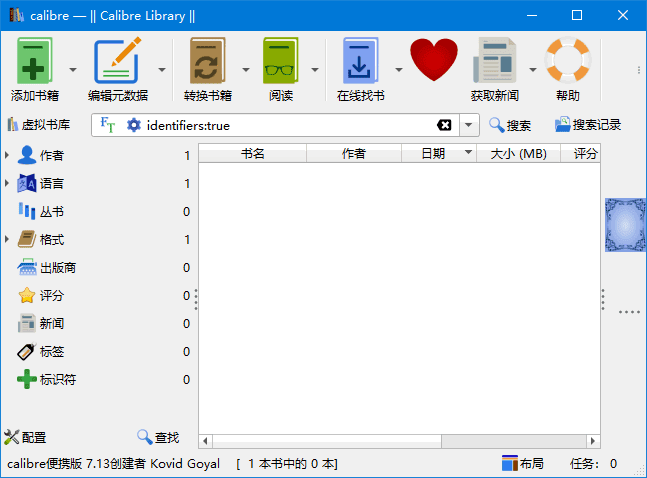
软件功能
电子书转换:Calibre 可以将电子书从一种格式转换为另一种格式,例如从 EPUB 转换为 MOBI 或 PDF。它支持广泛的格式,包括 EPUB, MOBI, AZW3, PDF, HTML, RTF, LIT, LRF, CHM, PDB, TXT 等。
图书馆管理:用户可以轻松地组织和搜索大量的电子书集合。Calibre 提供了分类、标签、作者、标题等多种方式来整理电子书。
元数据编辑:Calibre 允许用户编辑电子书的元数据信息,如书名、作者、出版日期、封面图片等。
新闻下载与转换:Calibre 支持从互联网下载新闻或杂志,并将其转换成电子书格式,方便用户在电子阅读器上阅读。
同步支持:可以将电子书同步到多种设备上,如 Kindle、Nook、iPad 等,确保无论使用何种设备都能访问自己的电子书库。
插件扩展:Calibre 拥有丰富的插件生态系统,用户可以通过安装插件来扩展软件的功能,满足特定需求。
软件特点
用户友好界面:Calibre 提供了一个直观易用的图形用户界面,使得即使是技术新手也能轻松管理电子书。
跨平台兼容性:Calibre 支持 Windows、macOS 和 Linux 等多个操作系统,确保了软件的广泛适用性。
强大的社区支持:由于是开源项目,Calibre 拥有一个活跃的开发者和用户社区,提供了大量的帮助和支持资源。
定期更新:开发团队经常发布新版本,增加新功能并修复已知的问题,确保软件始终处于最佳状态。
多语言支持:Calibre 支持多种语言界面,包括简体中文,这使得非英语国家的用户也可以方便地使用该软件。
更新日志
Release: 9.0 [30 Jan, 2026]
New features
A new Bookshelf view with your books arranged on shelves showing their spines.
Click the Layout button in the bottom right corner of the calibre window to switch to Bookshelf view.
Viewer: Add an "Edit book" button to the viewer controls to edit the current book when the current book is in an editable format such as EPUB, AZW3 or KEPUB. It opens the editor at the approximate location that is currently being viewed.
Linux: Add momentum based scrolling for the book list when using high resolution scroll devices like touchpads
TXT Output: Add an option to replace images by their alt attribute text
EPUB: Support reading cover images from so called "Open Manga Format" non-conformant EPUB files produced by some Japanese publishers.
Add a tweak to change the font size of the AI chat widget
E-book viewer: Allow typing in a page number to go to instead of forcing the user to scroll through existing page numbers
Kobo driver: Support for updated firmware
Bug fixes
KEPUB Output: Add some CSS to fix rendering of tate-chu-yoko text on Kobo devices
Only show the Sort button on the search bar if the Sort By action has not been added to the search bar by the user
EPUB3 metadata: Handle identifiers that use HTTP URLs without the url: prefix
Edit book: Check book: Fix spurious unreferenced warnings for SMIL media overlay audio files
Edit book: Reports: Have pressing enter do the same action as double clicking the current entry
E-book viewer: Improve export of SVG images
Disable GPU acceleration for Qt WebEngine by default to prevent crashes on some older systems. Can be re-enabled via Preferences->Tweaks
Speedup calibre shutdown time by a couple of seconds
Improved news sources
Times Literary Supplement
Private Eye
New Yorker
标签: Calibre
本站名称:爱下载
本站网址:https://www.axz.cc
本站所有文字内容与资源仅用于教育和研究使用
本站所有资源为网络搜集而来如有侵犯请邮件联系
本站下载者对资源方造成的损失或损害概不负责
由您下载所导致的一切风险与法律均由您自行承担
下载后请在24小时内删除,浏览下载即代表您同意